
Deed Records in Hidalgo County are publicly accessible through the clerk’s online portal, allowing users to search by owner name, property address, instrument number, or recording date. The Hidalgo County deed records search returns grantor and grantee names, legal description, deed type such as general warranty or quitclaim, and the instrument number. Fast access to the Hidalgo County deed lookup helps buyers verify ownership, track the chain of title, and request certified deed copies when needed.
Deed Records can also be obtained in person at the Hidalgo County Clerk’s office or via the official website, where the Hidalgo County deed records online portal provides instant PDF downloads and a deed record lookup tool. Users may request a Hidalgo County deed copy, a certified deed copy, or a simple property deed search for a modest fee. The system displays deed records by owner, by recording date, and by instrument number, ensuring reliable property history data.
How to Search Deed Records
Searching deed records in Hidalgo County helps you verify who owns a property, check past transfers, and confirm legal descriptions. The county clerk keeps these documents in both physical books and a digital database that the public can access. To explore further official documentation and local county filings, you can consult property owner index. Most searches begin on the official portal, then move to in-person review when certified copies are required.
This section explains the five main search methods, the details you need before you start, and how each method returns results. Knowing these steps saves time and reduces the number of false matches in your search.
Official Search Portal: https://hidalgo.tx.publicsearch.us/
Steps to Search
- Open the official portal at https://hidalgo.tx.publicsearch.us/ in a web browser.
- Select “Deed” or “Land Records” from the document type menu on the home screen.
- Enter your search field, such as an owner name, property address, instrument number, book and page, or recording date.
- Click the “Search” button and wait for the results list to load.
- Review the list of matching instruments, then click any record to view the scanned image.
- Use the toolbar above the image to zoom, print, or download the deed PDF.
- For certified copies, follow the on-screen link to the clerk’s request form or visit the office in person.
Search by Owner Name
An owner name search uses the grantor (seller) or grantee (buyer) field to find every deed linked to a specific person. Enter the last name first, then add the first name if the results are too broad. The portal matches names against the index entries recorded since the late 1800s, so partial spellings still return results in most cases.
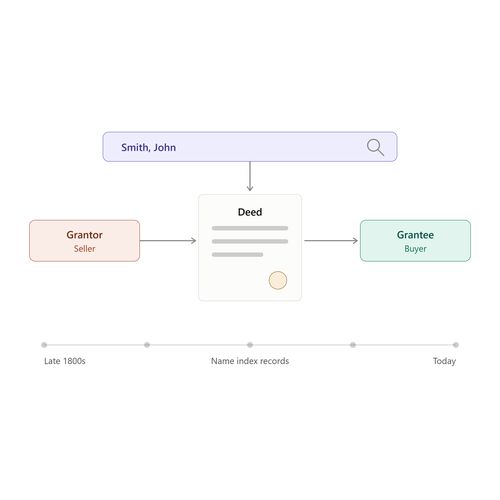
When the name is common, narrow the search with a middle initial or a recording date range. The search result shows each instrument number, the recording date, the document type, and the names of both parties. Click any row to open the scanned deed image.
Search by Property Address
A property address search works best when the address follows the standard street-number format used by the U.S. Postal Service. Type the house number, street name, and street type in the search box. Avoid punctuation like periods or commas, as the system may ignore them.
If the address does not appear in the results, try the legal description from a tax record instead. Older deeds often reference subdivision names, lot numbers, and block numbers rather than street addresses, so a legal description search fills the gap.
Search by Instrument Number
An instrument number is a unique code the clerk assigns to every recorded document. Once you know the number, type it directly into the instrument field on the portal. The search returns that single document with no extra matches.
Instrument numbers appear on prior deeds, title commitments, escrow papers, and lien releases. Title companies and real estate attorneys frequently share these numbers with buyers during a transaction. Use the number whenever it is available because it produces the fastest, most accurate result.
Search by Deed Book and Page
Older deeds were indexed by book and page rather than instrument numbers. Each county clerk book holds a fixed number of pages, and each page records one or more instruments. Book and page references appear on older title policies and property abstracts.
Enter the book number, then the page number, into the dedicated fields on the portal. The system opens the scanned page showing the original handwritten or typed entry. Some scans are low-quality because the source document is decades old, so enlarging the image helps readability.
Search by Recording Date
A recording date the day the clerk stamped the deed for the public record. Select a start date and an end date to define a range. The search returns every deed recorded within that window across the entire county.
Date ranges work well for tracking recent transactions, pulling a list of sales in a neighborhood, or checking whether a deed a seller mailed actually reached the clerk. Use shorter ranges when you need a quick count and longer ranges when conducting research.
Information Needed for a Deed Search
Successful searches start with the right data on hand. Gather these details before opening the portal:
- Full name of the current or prior owner, including middle initial when available.
- Property address, including house number, street, city, and ZIP code.
- Subdivision, lot, and block numbers from the legal description.
- Instrument number from a prior deed or title document.
- Book and page numbers for older research, especially before 1990.
- Recording date range for time-bound searches.
- Document type (warranty deed, quitclaim deed, deed of trust) to filter results.
Information Found on a Deed
A deed is a short legal document, but it contains several specific data points that establish ownership. Each field plays a role in identifying the parties, the property, and the moment ownership changed hands. Knowing what each field means helps you read every deed correctly.
Grantor Name
The grantor is the person or entity transferring ownership. On a warranty deed, the grantor is the seller. On a deed of trust, the grantor is the borrower who pledges the property as security. The name on the deed must match the name on the prior recorded deed for the chain of title to stay clean.
Grantee Name
The grantee is the person or entity receiving ownership. The grantee becomes the new owner once the deed is recorded. When two or more grantees are listed, the deed states whether they take title as joint tenants, tenants in common, or with rights of survivorship.
Legal Property Description
The legal description identifies the land using either a metes-and-bounds description, a lot and block number, or a subdivision reference. This description must match county survey records and tax parcel data exactly. A vague or incorrect legal description can void the deed or create title defects.
Deed Type
The deed type tells you what kind of transfer occurred. Common types include general warranty, special warranty, quitclaim, and deed of trust. Each type carries different warranties about the title and the grantor’s rights, which affects the buyer’s protection.
Recording Date
The recording date is the day the clerk accepted the deed for the public record. This date starts the chain of recorded ownership and protects the grantee from later claims. In Texas, recording acts follow the “first in time, first in right” rule, so earlier recording generally wins disputes.
Instrument Number
The instrument number is the unique identifier the clerk assigns when the deed is recorded. The number appears in the upper corner of the scanned document and in every index entry. Use this number for the fastest, most precise future searches on the same document.
Consideration Information
The consideration is the value exchanged for the property, usually the sale price. Texas requires the consideration to be stated on the deed for documentary stamp tax purposes. The amount does not always equal the market value, and gift deeds often list “$10 and other good and valuable consideration.”
Types of Deeds
Different deeds serve different transfer purposes. The type chosen for a transaction defines the warranties, the protections for the buyer, and the tax treatment. Selecting the right deed prevents future title disputes.
General Warranty Deed
A general warranty deed is the strongest deed for a buyer. The grantor guarantees the title against defects from any prior owner, not just from the grantor’s own period of ownership. Title companies prefer this deed because it shifts risk back to the seller for known and unknown claims.
Special Warranty Deed
A special warranty deed limits the grantor’s guarantee to the period of ownership. The grantor only defends against claims that arose while they owned the property. Commercial transactions, foreclosures, and sales by executors often use this deed type.
Quitclaim Deed
A quitclaim deed transfers whatever interest the grantor has without any warranty. It is fast, simple, and commonly used to clear title defects, add a spouse to a deed, or transfer property among family members. Buyers receive no protection against prior claims, so quitclaim deeds are rare in arm’s-length sales.
Deed of Trust
A deed of trust is a security instrument, not a sale. The borrower transfers legal title to a trustee who holds it until the loan is paid. Once the loan ends, the trustee records a deed of reconveyance, returning full title to the borrower.
Transfer on Death Deed
A transfer on death deed allows a property owner to name a beneficiary who receives the property automatically when the owner dies, without probate. Texas adopted this deed under Property Code Section 114. The deed can be revoked at any time before death, and it does not affect the owner’s rights while alive.
Correction Deed
A correction deed fixes errors in a previously recorded deed, such as misspelled names, wrong legal descriptions, or missing signatures. The correction deed references the original instrument number and explains the change. Recording a correction deed clears most title defects caused by clerical mistakes.
Property Ownership Transfers
Each recorded deed marks a single ownership transfer. Tracking these transfers builds the chain of title, which proves who owns the property today. The county clerk’s office stores every deed from the earliest county records to the present.
Grantor to Grantee Transfer
The grantor-to-grantee line on every deed records the moment ownership moves from one party to another. The date on this line, combined with the recording date, establishes when the buyer became the legal owner. Title companies rely on this data to issue title insurance.
Transfer of Property Interest
Deeds can transfer full interest or partial interest. A deed that conveys “all of grantor’s right, title, and interest” passes complete ownership. A deed that conveys “an undivided one-half interest” transfers only a share, which leaves the property in co-ownership.
Multiple Owners
When two or more people take title together, the deed specifies the form of co-ownership. Joint tenancy with right of survivorship passes the deceased owner’s share to the surviving owners automatically. Tenancy in common passes the share to the deceased owner’s heirs through probate.
Ownership Transfer Dates
The transfer date and the recording date are often different. The transfer date is when the parties signed the deed. The recording date is when the clerk filed it. Texas recognizes the recording date as the official start of public notice, so the gap between these dates affects priority against later claims.
Recorded Ownership Changes
Every recorded ownership change adds a new entry to the property’s chain of title. Lenders, buyers, and title examiners trace these entries backward until they reach the root deed. Clean chains have no gaps; broken chains require correction deeds or quiet title actions.
Deed Recording Process
Recording a deed places it in the public record and protects the buyer’s interest. Texas counties follow a defined process for accepting, indexing, and storing these documents. Knowing the process helps you prepare the deed correctly the first time.
Where Deeds Are Recorded
Deeds are recorded in the county where the property is located, not where the owner lives. In Hidalgo County, deeds are filed with the Hidalgo County Clerk at the courthouse in Edinburg. Each Texas county maintains its own independent set of records.
Recording Requirements
Texas law requires every deed to include the grantor’s signature, a legal property description, the granting clause, and a return address for the clerk. The deed must be on paper sized 8.5 by 11 inches or 8.5 by 14 inches. Margins must allow the clerk to stamp recording information without covering text.
Signatures and Notarization
Every grantor must sign the deed in front of a notary public. The notary verifies identity, watches the signature, and affixes a seal with commission expiration date. Texas rejects deeds that lack a proper notary acknowledgment, so skipping this step voids the filing.
Recording Fees
The Hidalgo County Clerk charges a base recording fee for the first page of a deed and an additional fee for each subsequent page. Documentary stamp taxes apply at $0.50 per $500 of consideration and are collected at the time of recording. Exact fees depend on page count, so contact the clerk for a quote before filing.
Document Acceptance
Once submitted, the clerk reviews the deed for legal compliance. The review checks signatures, notarization, margins, and statutory requirements. Deeds that pass the review receive an instrument number, a recording date, and a stamp before being scanned into the digital system.
Recording Confirmation
After recording, the clerk returns the original deed (or a stamped copy) to the filer. The instrument number and recording date appear on the stamped copy. These details serve as proof that the deed is now part of the public record and visible on the official portal.
Hidalgo County Deed Records Public Information
Hidalgo County deed records are public under the Texas Public Information Act and the Texas Property Code. Any person may view, copy, or request records without stating a reason. The clerk provides several access channels to serve both casual searchers and professional users.
Public Deed Information
The grantor and grantee names, recording date, instrument number, and document type are public. Anyone can search these fields on the official portal at no charge. Scanned images of most deeds from the past several decades are also available for viewing.
Online Deed Records
The Hidalgo County public search portal at https://hidalgo.tx.publicsearch.us/ lets users search, view, and download deeds 24 hours a day. Image quality varies because older documents were scanned from microfilm. Records indexed since 2000 are usually clear and fully searchable.
Recorded Document Information
Recorded document access includes deeds, deeds of trust, liens, releases, easements, and related instruments. Use the document type filter on the portal to narrow searches to deeds only. The portal also indexes plat records, which can help locate subdivision maps for legal descriptions.
Restricted Information
Certain personal identifiers are removed or restricted from public view, such as Social Security numbers, driver’s license numbers, and certain financial account details. Redacted information may be available to qualified parties such as the named grantor, grantee, or attorney of record.
Records Available by Request
Records not yet scanned or too large for the portal can be requested directly from the clerk’s office. Submit a written request with the instrument number, book and page reference, or recording date range. The clerk retrieves the document and provides copies or certified copies for a fee.
Certified Deed Copies
A certified deed copy includes a clerk’s stamp, signature, and seal verifying that the copy is a true reproduction of the recorded document. Title companies, courts, and government agencies require certified copies for transactions. The clerk charges a higher fee for certified copies than for plain copies.
How to Obtain a Copy of a Deed
You can obtain a deed copy online, by mail, or in person. The method you choose depends on how quickly you need the document and whether it must be certified. Each method has its own fee schedule and processing time.
Online Copy Requests
The portal lets you download a non-certified PDF of most deeds for a small fee per page. Credit or debit card payment is required. Once paid, the PDF is available immediately for printing or saving. Non-certified copies work for personal research but not for legal filings.
County Clerk Requests
Mail requests to the Hidalgo County Clerk work for records that are not yet online. Include the instrument number or book and page reference, a self-addressed stamped envelope, and a check or money order for the copy fee. The clerk returns the copy by mail within five to ten business days.
In-Person Requests
Visit the clerk’s office at 100 N. Closner Blvd., 1st Floor, Edinburg, TX 78539, Monday through Friday from 8:00 AM to 5:00 PM. Staff assist with record searches, print copies, and certify documents on the spot. Same-day service is available for most requests.
Certified Copies
Certified copies carry the clerk’s raised seal and signature. They prove the deed is a true copy of the recorded original. Request certified copies in person or by mail and specify which page or instrument is needed. Certified copies cost more than plain copies and require additional processing.
Copy Fees
Standard copy fees in Texas counties typically range from $1.00 to $5.00 per page for non-certified copies, with certified copies costing more. The Hidalgo County Clerk’s office sets its fees under the Texas Local Government Code. Contact the clerk at (956) 318-2100 for the current fee schedule before paying.
Processing Times
Online downloads are instant. Mail requests take five to ten business days after receipt. In-person requests are completed the same day in most cases. Rush services are not generally offered, so plan ahead for closings or court deadlines.
Reading and Reviewing a Deed
Reading a deed correctly requires checking every section in order. A missed field can lead to a false assumption about ownership. You can also cross-reference these findings by accessing verified property search online. The following six checks walk through the most important parts of any deed.
Identifying the Parties
The first paragraph names the grantor and grantee. Confirm the spelling matches prior deeds. A small typo can break the chain of title and force a correction deed later. Also confirm that marital status and vesting are correct.
Finding the Legal Description
The legal description is usually the second major paragraph. It may reference a subdivision with lot and block numbers, or it may use a metes-and-bounds description starting at a survey marker. Compare the description with the prior deed and the county appraisal district records.
Locating the Recording Information
The recording information appears as a stamp on the first page and includes the instrument number, recording date, and clerk’s signature. Verify the recording date falls after the date the grantor signed the deed. Out-of-order dates signal a clerical error.
Identifying the Conveyed Interest
The granting clause states what interest is being transferred. Look for phrases such as “grants and conveys,” “bargains, sells, and conveys,” or “quitclaims.” Each phrase carries a different warranty level and affects the buyer’s protection.
Reviewing Deed Restrictions
Restrictions limit how the property can be used. They may cover building setbacks, architectural styles, rental use, or commercial activity. Review each restriction to confirm it does not conflict with the buyer’s plans.
Checking Referenced Documents
Many deeds reference prior instruments such as easements, restrictive covenants, or prior deeds. Pull each referenced document from the public record to understand the full picture. Skipping this step can leave hidden restrictions or unresolved liens in place.
Deed Records and Ownership History
Ownership history tells the story of a property from the first recorded deed to the present. Reviewing this history protects buyers, supports estate planning, and helps resolve boundary disputes. Older parcels sometimes have gaps that require additional research.
Previous Deeds
Previous deeds are the earlier instruments in the chain of title. Each previous deed names a different grantor and grantee and shows how ownership moved over time. Reviewing at least the last three prior deeds is standard practice in Texas title examinations.
Historical Transfers
Historical transfers include sales, gifts, foreclosures, and court-ordered conveyances. Each type affects the chain differently. Court-ordered transfers such as probate deeds or sheriff’s deeds may carry different warranty levels than standard sales.
Chain of Recorded Deeds
A clean chain of recorded deeds links each owner to the next without gaps. Title examiners read the chain backward from the present to confirm unbroken ownership. Breaks require correction deeds, quitclaim deeds, or quiet title actions to restore marketability.
Gaps in Deed History
Gaps appear when an instrument was never recorded, was recorded in the wrong county, or was lost. Common causes include family transfers done informally, errors during probate, or missing pages from fires or floods. Gaps must be resolved before a buyer can obtain title insurance.
Older Recorded Documents
Older recorded documents can be harder to read because they were handwritten, typed on fragile paper, or stored on microfilm. The Hidalgo County Clerk has preserved these records, and many are now scanned. Use high zoom levels and compare spelling variants to match old names.
Deed Record Accuracy and Limitations
Deed records are only as accurate as the documents filed and the indexing work performed. Errors and limitations are part of the public record, and users should know how to spot them. Reviewing for accuracy saves time during closings and prevents costly disputes.
Incorrect Names
Incorrect names appear when the grantor’s or grantee’s name is misspelled, changed through marriage, or transcribed incorrectly. Compare each name to government-issued identification and prior deeds. Significant name variations may require an affidavit of identity or a correction deed.
Property Description Errors
Property description errors include wrong lot numbers, incorrect acreage, or references to the wrong subdivision. Cross-check the description with the county appraisal district, survey records, and prior deeds. Errors often require a correction deed and possibly a new survey.
Duplicate Records
Duplicate records appear when the same deed is recorded twice or when two instruments cover the same transfer. Compare instrument numbers, recording dates, and legal descriptions. If duplicates exist, the clerk can flag the second entry to avoid confusion.
Missing Documents
Missing documents include deeds that were signed but never recorded, or that were recorded but later lost. A title search revealing a gap usually means a corrective instrument is needed. Quiet title actions in district court are the legal remedy for persistent gaps.
Recently Recorded Deeds
Recently recorded deeds may not appear on the portal immediately because of indexing delay. Allow 24 to 72 hours after recording for the document to show up online. For real-time data during a closing, contact the clerk’s office directly.
Unrecorded Instruments
Unrecorded instruments include deeds, contracts, and liens that were signed but never filed. Unrecorded instruments are valid between the parties but lose priority against later buyers who record first. Title searches cannot find unrecorded instruments, which is why title insurance exists.
Differences Between Deed Records and Other Property Sources
Deed records focus on ownership transfers, while tax records, appraisal records, and lien records carry different data. Comparing these sources provides a complete picture of the property’s status. Relying on only one source can leave important issues hidden.
Search Problems
Even experienced searchers run into problems when working with public records. Most problems fall into a small number of categories. Knowing the categories helps you resolve issues quickly.
Deed Not Found
A deed not found usually means the search field is wrong or the deed was recorded under a different name. Try alternative spellings, the legal description, or the instrument number. If the deed still does not appear, contact the clerk’s office to confirm whether it was recorded.
Incorrect Owner Name
Incorrect owner name entries happen when the search field uses a nickname, abbreviation, or outdated spelling. Search using the legal name from government documents, not the common name. Include middle initials to narrow results when names are common.
Incorrect Property Address
Incorrect property addresses happen when the street name is misspelled, the city is wrong, or the address was changed after recording. Search using the legal description or the previous owner’s name as alternatives.
Incorrect Instrument Number
Incorrect instrument numbers usually result from transcription errors. Cross-check the number against the recording date and the grantor name. A single wrong digit produces no result, so recheck carefully.
Historical Deed Unavailable
Historical deeds may not be online yet. Older records require an in-person or mail request to the clerk. Some very old documents are stored only as microfilm, and the clerk must pull them manually.
Restricted Document
Restricted documents are sealed by court order or contain redacted personal identifiers. Access requires a court order or proof of legal interest. The redaction notice on the portal explains why access is limited and what steps to take.
Record Not Yet Updated
Records not yet updated reflect the indexing backlog after a recent recording. Wait at least 72 hours, then retry the search. For closings scheduled close to recording dates, contact the clerk for a manual check.
Contact Details
For certified copies, complex searches, or questions about specific documents, contact the Hidalgo County Clerk directly. Office hours and location details follow.
| Detail | Information |
|---|---|
| Office | Hidalgo County Clerk |
| Location | Hidalgo County Courthouse, 100 N. Closner Blvd., 1st Floor, Edinburg, TX 78539 |
| Phone | (956) 318-2100 |
| Office Hours | Monday – Friday: 8:00 AM – 5:00 PM |
| Official Search Portal | https://hidalgo.tx.publicsearch.us/ |
Frequently Asked Questions
Deed records in Hidalgo County give public access to the legal history of any piece of land. They show who owned the property, how the title moved, and any attached restrictions. By searching these records you can verify ownership before buying, settle a boundary dispute, or research family heritage. The county clerk keeps both paper books and a digital database that anyone can reach online or in person. Quick access saves time, reduces risk, and provides a clear trail of title for lenders, buyers, and researchers alike.
How can I search Hidalgo County deed records online?
Visit the county clerk’s public search site at https://hidalgo.tx.publicsearch.us/. Create a free account or use guest access. Choose “Deed Records” from the menu, then enter the grantor, grantee, or property address. You can narrow results by instrument type, recording date, or book and page number. The portal shows a short preview of each document; click the link to download a PDF for a small fee. If you need a certified copy, note the instrument number and request the copy in person or by mail using the provided form.
What information do I need to request a certified copy of a Hidalgo County deed?
Write down the instrument number or the book and page where the deed is filed. Include the grantor and grantee names and the property’s legal description. Bring a valid photo ID and a completed request form, which you can download from the clerk’s website. The office charges $1 per page for the copy and $5 for certification. Submit the request in person at 100 N. Closner Blvd., Edinburg, or mail it with a self‑addressed envelope and the required payment.
How do I find deed records by instrument number or recording date in Hidalgo County?
Log in to the official search portal and select the “Advanced Search” option. Enter the exact instrument number in the designated field to retrieve that specific deed. If you only have a recording date, choose the date range filter and set the start and end dates. The results list the volume, book, and page for each match, allowing you to view the document preview or request a copy. You can also sort the list by date to see the most recent filings first.
Why might a deed search return no results for a property address in Hidalgo County?
Often the address used in the deed differs from the current mailing address. The clerk indexes records by the legal description, not the street address, so a search by address may miss the file. Recent filings may not yet appear in the online database. Also, applying extra filters such as instrument type can hide matches. To fix this, try searching with the grantor or grantee name, use a broader date range, or check the physical index at the clerk’s office for the latest entries.
How can I verify the chain of title using Hidalgo County deed records?
Start with the most recent deed for the parcel. Note the grantor name and the instrument number, then locate the prior deed where that grantor appears as a grantee. Repeat the process, moving backward through each document. The online portal displays the book, volume, and page for every entry, making it easy to pull the PDF of each record. Keep the legal description consistent to ensure you are following the same parcel. If a gap appears, visit the clerk’s office to review the microfilm indexes for missing instruments.